
Serailization in .NET
Serialization:
Serialization is the process of saving the state of an object in a persistent storage media in the form of linear stream of bytes. The object can be stored to a file, a database or even in the memory. Serialization in .NET is provided by the System.Runtime.Serialization namespace.
In order for a class to be serializable, it must have the attribute SerializableAttribute set
and all its members must also be serializable, except if they are ignored with the attribute NonSerializedAttribute. However, the private and public members of a class are always serialized by default. The SerializationAttribute is only used for the binary serialization.
[Serializable]
public class Student
{
private int StudentID;
public string StudentName;
public void dispaly()
{
Console.WriteLine("Student Name "+ StudentName);
}
}
Binary Serialization:
In Binary serialization the entire object state is saved. Both public and private members states are saved.
//The following way Student object is serialized
public void BinarySerialize(string filename, Student Stud)
{
FileStream fileStreamObject;
try
{
fileStreamObject = new FileStream(filename, FileMode.Create);
BinaryFormatter binaryFormatter = new BinaryFormatter();
binaryFormatter.Serialize(fileStreamObject, Stud);
}
finally
{
fileStreamObject.Close();
}
}
//The following way Deserialize the Student Object
public static object BinaryDeserialize(string filename)
{
FileStream fileStreamObject;
try
{
fileStreamObject = new FileStream(filename, FileMode.Open);
BinaryFormatter binaryFormatter = new BinaryFormatter();
return (binaryFormatter.Deserialize(fileStreamObject));
}
finally
{
fileStreamObject.Close();
}
}
Serialization is used to transportation of an object through a network.
How to Fix cross mark in Crystal report while exporting to Excel
In your application, while exporting crystal report to Excel your getting cross mark in spite of image.Like this

Problem is not in the crystal report.Dont waste time your in Crystal report.
Solution is in your Business logic,check your size of the image/bitmap.
Ensure image height and width are same before exporting to crystal report.
it is working for me..Enjoy it..
How to Fix/Solution for Internet Explorer cannot open the Internet site and operation aborted in Blog
In blog, your getting message like this Internet Explorer cannot open the internet site with following links and operation aborted...
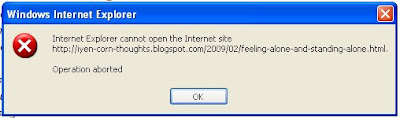 Check out your Blog spot settings, where your Comment form placement in your blog. If it is Embedded below post like this...

ahhahhha...Enjoy it...
Check out your Blog spot settings, where your Comment form placement in your blog. If it is Embedded below post like this... Solution is simply and Easy,Change it Embedded below post to Full page.
it is working...
ahhahhha...Enjoy it...
How to Call Javascript function through CodeBehind(C#)
Yeah,It is easy to Call javascript function through codebehind by using
Attributes.Add to the button.
whole code like this..
Attributes.Add to the button.
use this code..
Button1.Attributes.Add("onclick", "return callingfn()");
Consider javascript as follows
<script defer="defer" type="text/javascript" language="javascript">
function callingfn()
{
var objTextBox = document.getElementById('TextBox2');
objTextBox.value = "123";
return objTextBox.value();
}
</script>
whole code like this..
<html >
<head runat="server">
<title> Untitled Page</title>
<script defer="defer" type="text/javascript" language="javascript">
function callingfn()
{
var objTextBox = document.getElementById('TextBox2');
objTextBox.value = "123"
return objTextBox.value();
}
</script>
</head>
<body>
<form id="form1" runat="server">
<div>
<table>
<tr>
<td>
<asp:TextBox ID="TextBox2" runat="server" > </asp:TextBox> </td>
</tr>
<tr>
<td align ="center"> <asp:Button ID="Button1" runat="server" Text="Button" />
</td>
</tr>
</table>
</div>
</form>
</body>
</html>
SQL Server 2000 Workload Governer
Workload governor limits the performance of MSDE if the SQL engine receives more load than limit of MSDE(8 Cuncurrent connection).
Workload governor sits between the client and the database engine and counts the number of connections per database instance. If Workload governor finds that the number of connections exceeds eight connections, it starts stalling the connections and slowing down the database engine.
It does not limit the number of connections but makes the connection request go slow. By default 32,767 connections are allowed both for SQL SERVER and MSDE.
Subscribe to:
Posts (Atom)